 Available
Warehouse App for Abas ERP
Receipts, issues, transfers – scanned instead of typed
Warehouse staff scan article, location and lot and post a receipt, issue or transfer straight into Abas ERP – one-handed, without typing and without a second database.
- Platforms
- iPhone
- Status
- Available
- Pricing
- Licence per device · billed monthly or annually in advance
- Where to get it
- Download on the App Store
- Support
- support@ccschwarz.de
Screenshots



Features
Scan, don't type
Article, storage location, lot: everything that would otherwise be typed comes off the label. The camera reads EAN, Code 128, Code 39, QR, DataMatrix and GS1-128; a Bluetooth scanner in keyboard mode does the same without bringing up the on-screen keyboard.
One label, three bundle fields
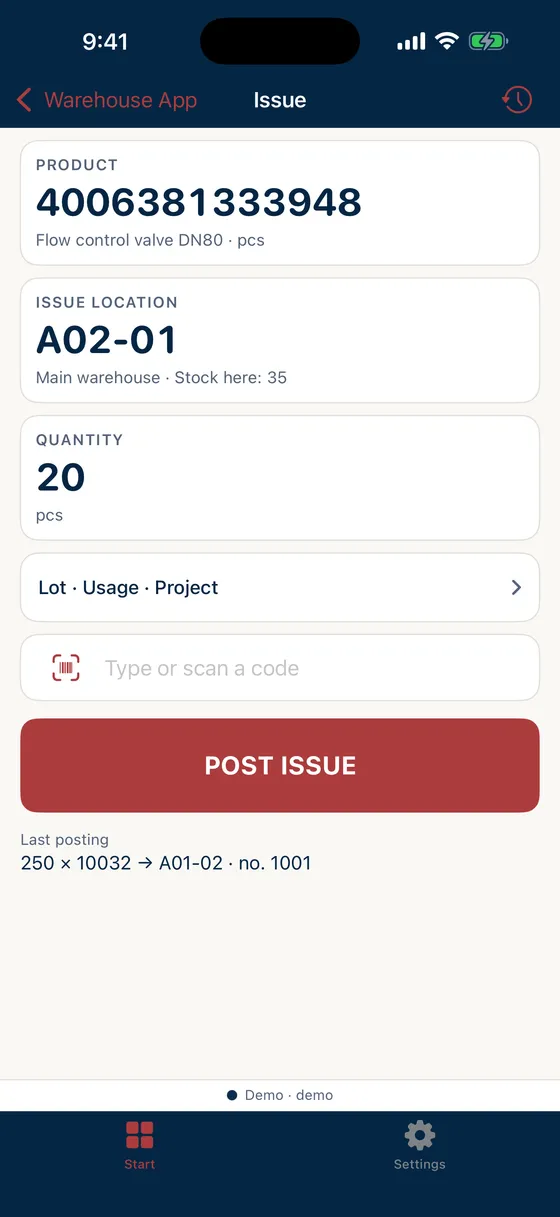
A single bundle label fills lot, usage and project in one scan. The issue warns when the article is not at the location or the lot does not match.
Your labels, your rules
What a barcode means is set up once in the customer portal – as a prefix, a fixed length, a key format, separated fields or GS1. The app reads every scan with exactly these rules, on every device, without an app update.
Built for one hand
Large tiles that can be hit with a glove on, digits readable at arm's length, one button to post. No swipe gestures. The screen stays on, a short tone confirms the posting, a low double tone reports an error.
Posted in Abas immediately
Every posting lands live in your own Abas installation and carries its ID number. If the answer does not arrive, the app checks the stock journal instead of posting again. Reversal from the device's log.
Stock at a glance
The stock inquiry shows stock per article and location, with lots, from the Abas info system – one scan is enough.
Why the terminal down the aisle is the problem
The goods are at the location, but they are posted only when someone walks to the terminal – or from a slip in the evening. Until then the ERP shows a stock level that does not exist, and whoever needs a lot looks for it on the shelf. Every detour costs time, every retyping is a source of error.
The Warehouse App closes exactly that gap: it brings the manual stock posting of Abas ERP to where the goods are and posts immediately – with lot, usage and project taken from the label.
How the app fits into the workflow
Choose receipt, issue or transfer, scan the article, scan the location, tap the quantity, post. A bundle label brings lot, usage and project along; on an issue the app shows what lies at the location and warns when article or lot do not match. The posting is in Abas ERP immediately, with its ID number in the device’s log – and can be reversed from there.
What a barcode means is written on your labels, not in a standard. That is why you define the rules in the customer portal, per ERP installation; the app reads every scan with them, on every device, without an update.
Online only, on purpose
The app keeps no offline buffer. What is posted is in the ERP; what could not be posted, the app says immediately. If the answer to a posting does not arrive, it checks the stock journal instead of posting a second time – in a warehouse a double posting costs more than a retry.
Purchase and licensing
The licence is purchased and managed in the customer portal; users download the app itself from the App Store. Billing is in advance, monthly or annually. The details – number of licences, fees and minimum term – are set out in the respective order; the Terms of Use apply in addition.
Requirements
- Abas ERP version 2100r8 or later (earlier versions are not supported)
- An active, separately licensed Abas ERP instance of the company
- Access to the Abas REST server
- Labels with barcodes on articles, locations and bundles
- An iPhone per user, optionally a Bluetooth scanner in keyboard mode
- A company account in the customer portal and an activated installation
Abas ERP itself is a product of Forterro Abas Deutschland GmbH and is licensed independently of this app; information about the ERP system is available from the vendor at abas-erp.com.
Data processing in brief
The app is not a cloud service. Postings and stock levels are exchanged directly between the app and your Abas ERP; we have no access to them. The camera reads barcodes on the device; images are neither stored nor transmitted. We only process what is needed for the contract, licence checks and support. Details are in the privacy notice for the app.
Frequently asked questions
Which Abas version is required?
Are changes to Abas ERP required?
Which barcodes and scanners are supported?
Does the app work offline?
How can access to the Abas REST server be set up?
How is the app licensed?
Do we need an Abas ERP licence as well?
Do you as the vendor see our warehouse data?
Let's talk about your project
A first conversation costs nothing but half an hour – and afterwards you will know whether we are a good fit.