 Available
Sales App for Abas ERP
The sales desk on the iPad – look it up, quote it, order it
Look up customers, prospects, contacts and parts live in your own Abas ERP, and write quotations and sales orders straight into it – from the iPad at the customer's site. What you read is the record in the ERP.
- Platforms
- iPad · iPhone
- Status
- Available
- Pricing
- Licence per device · billed monthly or annually in advance
- Where to get it
- Download on the App Store
- Support
- support@ccschwarz.de
Screenshots
Features
Live in the ERP, not in a copy
There is no second database and no offline copy. What stands on the device is the record in your Abas installation, and what is written goes straight back into it – nothing has to be reconciled, nothing can drift apart.
Find a record in seconds
Every area has its own search mask, with the operators you know from Abas: equal, contains, from–to, unequal. Results load page by page as you scroll, and the records opened last are ready before you search at all.
The record, the way sales reads it
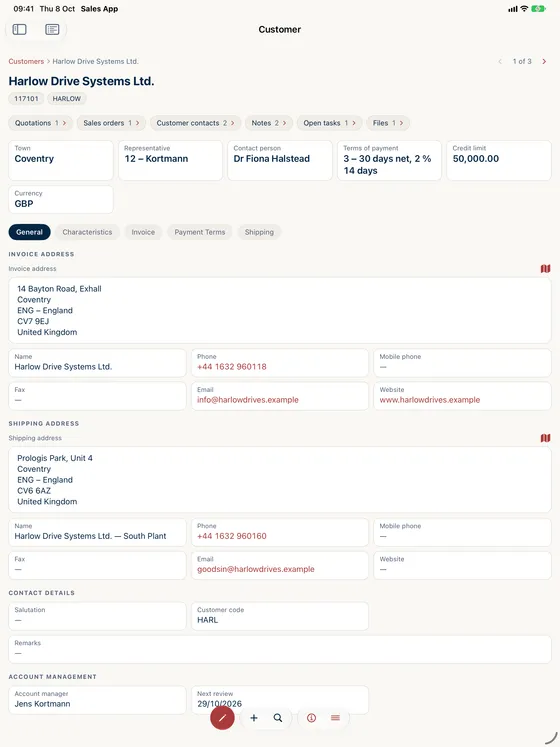
Above the tabs, a profile strip carries the fields that decide a conversation: place, representative, contact, terms of payment, credit limit, currency. Tap a phone number to call, an address to open it in Maps, an email address to write. Payment and reminder locks show as a tag in the header.
Write, don't transcribe
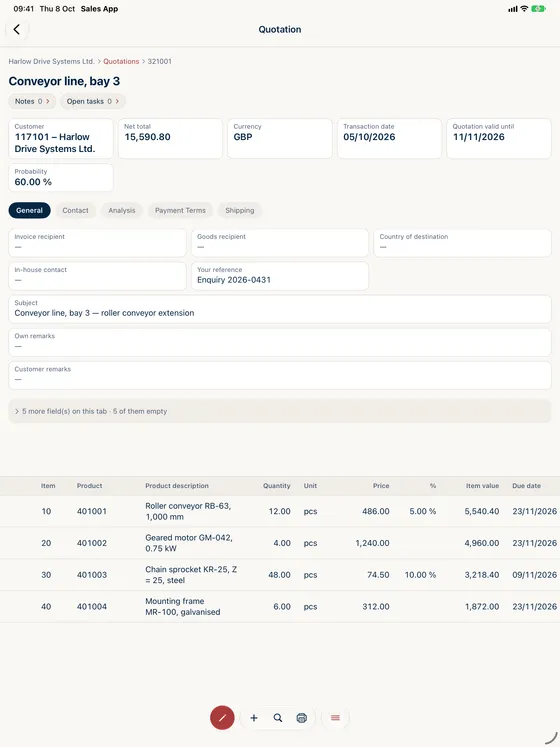
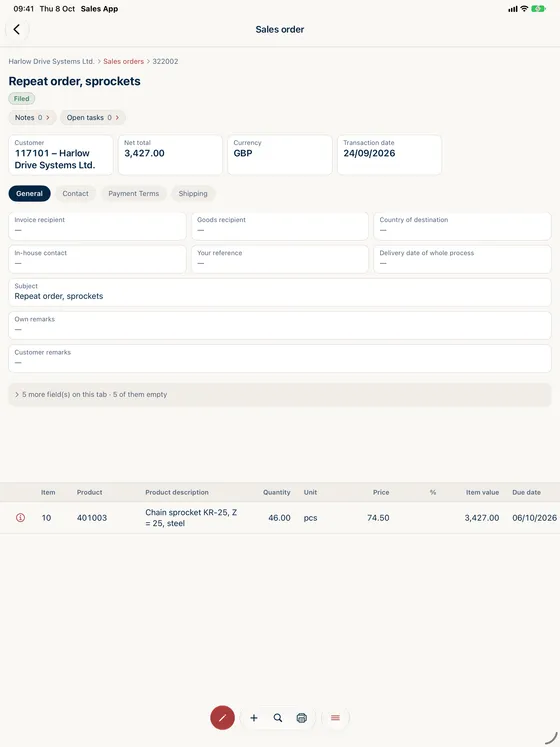
Start a quotation or a sales order on the device: pick the customer, and the address, the representative and the terms of payment fill themselves. The app works in a real Abas working set – every derived value is the one your ERP would derive at the desk. Add positions, change quantities, prices and discounts, move lines, print the finished document.
Masks your own company decides
Which fields a device shows, what they are called, in which order they stand and which tabs of your own sit beside them is configured once in the CCSchwarz customer portal – and reaches every device without an app update.
Made for how selling actually goes
Three columns on iPad – areas, hits, record – each pinnable and out of the way when the record needs the width. On iPhone the same app, one column at a time. Face ID, Touch ID or the device passcode lock an unattended iPad without signing you out of the ERP. Several mandants, light and dark, English and German.
Why sales otherwise does the work twice
At the customer’s site the one number that is missing is the one that sits in the ERP: the credit limit, the last price, the terms of payment. So somebody calls, writes it down, and types it in later – and between the meeting and the entry there are hours in which the quotation does not exist. Printing an extract only postpones the problem: the printout is wrong from the moment anyone in the office changes something.
Sales App closes that gap by not opening a database of its own at all. It reads and writes live in your Abas installation. What stands on the iPad is the record in the ERP; what is created there is created in the ERP.
Looking things up mid-conversation
Customers, prospects, contacts and parts each have their own search mask, with the operators your people know from Abas. The result list loads as you scroll, and the records opened last are ready before the first search.
The record itself opens with what decides a conversation – place, representative, contact, terms of payment, credit limit, currency – and below that follow the tabs of the ERP screen. From a customer, their quotations, orders and contacts are one tap away.
Quotations and orders happen where the selling happens
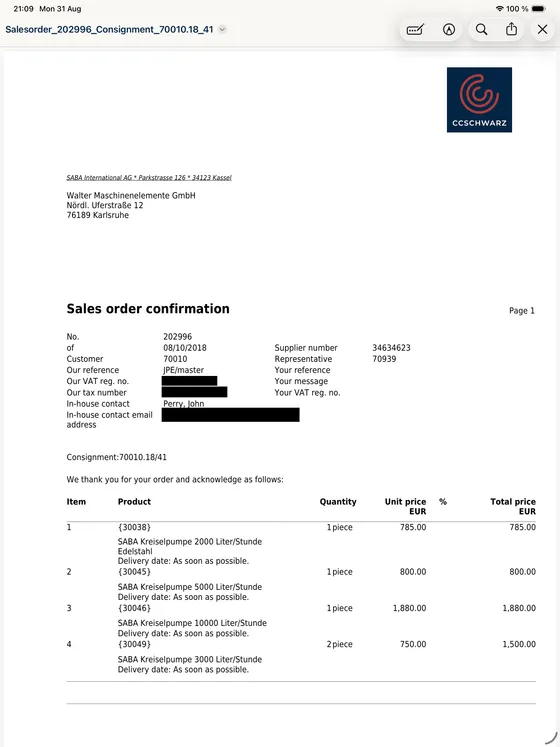
Start the document on the device, pick the customer – address, representative and terms of payment fill themselves. This is not a re-implementation of the ERP logic: the app works in a real Abas working set, and every derived value comes from your ERP. Add positions, change quantities, prices and discounts, move or remove lines, and print the finished document on the printer set up for your installation.
The mask belongs to your company
No two companies carry the same fields. Which fields a device shows, how they are labelled, in which order they stand and which tabs of your own sit beside them is configured once in the CCSchwarz customer portal. The change reaches every device without a new version of the app – and whatever your installation does not carry, the app leaves out by itself.
Purchase and licensing
The licence is bought and managed in the customer portal; the app itself is downloaded from the App Store by the users. A device is registered once and is then known to all of our Abas apps; licensing happens per app. Billing is in advance, monthly or annually. The details – number of licences, fee and minimum term – are set out in the respective order; the terms of use apply in addition.
Requirements
- Abas ERP version 2019r4 or later (older versions are not supported)
- An active, separately licensed Abas ERP instance of the company
- Access to the Abas REST server
- A network connection in the field – the app works live and has no offline mode
- An iPad or iPhone for the users
- A company account in the customer portal, a registered device and an enabled installation
Abas ERP itself is a product of Forterro Abas Deutschland GmbH and is licensed independently of this app; information about the ERP system is available from the manufacturer at abas-erp.com.
Data processing in brief
The app is not a cloud service. Customer, part and document data are exchanged directly between the app and your Abas ERP; we have no access to them. What sits with us is the device, installation and licence data, plus whatever the contract and support require. The details are in the privacy notice for the app.
Frequently asked questions
Which version of Abas is required?
Do we have to modify Abas ERP?
How can access to the Abas REST server be arranged?
Does the app work without a connection?
Who decides which fields appear on the device?
Does an iPad have to be registered separately for each of your Abas apps?
How is the app licensed?
Do we also need an Abas ERP licence?
Do you as the vendor see our customer and document data?
Let's talk about your project
A first conversation costs nothing but half an hour – and afterwards you will know whether we are a good fit.